
IGET VAPE
how to recharge iget bar pro
May
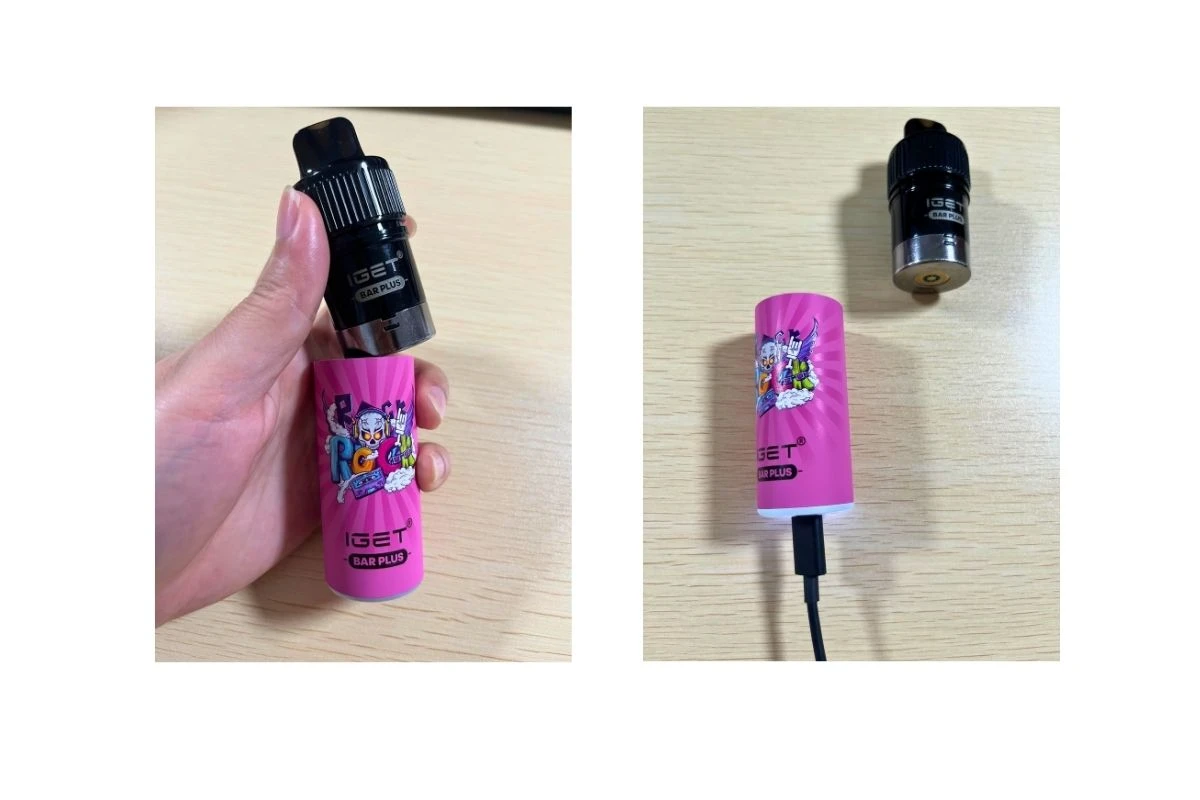
How to Recharge an IGET Bar Pro Safely and Effectively Disposable vapes have become increasingly popular because of their convenience, sleek design, and ease of use. Among the many options available, the IGET Bar Pro stands out for its long-lasting battery life, smooth flavor delivery, and user-friendly experience. However, many users eventually ask the same question: can you recharge an IGET Bar Pro, and if so, how do you do it safely? Although the IGET Bar Pro is primarily designed as a disposable vape, some models can be recharged to maximize the remaining e-liquid before disposal. Understanding the correct way to recharge the device can help you avoid damaging the vape, improve safety, and extend its usability. In this guide, we’ll explain everything you need to know about recharging an IGET Bar Pro, including the tools you need, step-by-step instructions, common mistakes to avoid, and important safety tips. Can You Recharge an IGET Bar Pro? The answer depends on the specific model you own. Some IGET Bar Pro devices come with a built-in rechargeable battery and a USB charging port, while others are fully disposable and not intended for recharging. If your device includes a USB-C or micro-USB charging port at the bottom, it is rechargeable. If there is no charging port visible, attempting to force a recharge can be dangerous and may permanently damage the vape. Before charging, inspect the device carefully and read any packaging instructions provided by the manufacturer. Why Recharge an IGET Bar Pro? Many users choose to recharge their IGET Bar Pro because the battery may die before all the e-liquid has been used. Recharging allows you to continue vaping until the liquid is fully depleted, helping reduce waste and maximize value. Benefits of recharging include: Extending the life of the vape Saving money Reducing unnecessary waste Maintaining consistent vapor production However, it’s important to remember that disposable vapes are not designed for endless reuse. Recharging should only be done within safe limits. What You Need Before Charging Before you begin, gather the following items: Your IGET Bar Pro device A compatible USB charging cable A low-voltage power source such as a laptop or standard wall adapter A clean and dry surface Avoid using high-speed phone chargers or damaged cables, as they can overheat the battery and create safety risks. Step-by-Step Guide to Recharge an IGET Bar Pro Step 1: Locate the Charging Port The charging port is usually found at the bottom of the device. Most newer models use a USB-C connection, though some older versions may use micro-USB. Check for dust, lint, or debris around the port before connecting the charger. Step 2: Connect the Charging Cable Insert the charging cable gently into the device. Do not force the connection, as this can damage the port. Once connected, plug the other end into a low-power charging source. Many users prefer charging through a computer USB port because it delivers stable power and lowers the risk of overheating. Step 3: Monitor the Charging Indicator Some IGET Bar Pro devices include an LED indicator light. This light may flash or remain illuminated while charging and turn off when the battery is fully charged. If your device becomes excessively hot during charging, disconnect it immediately. Step 4: Wait for the Device to Charge Charging times usually range from 30 minutes to 1 hour depending on the battery capacity and remaining charge level. Avoid leaving the vape plugged in overnight. Overcharging can shorten battery lifespan and increase safety risks. Step 5: Disconnect and Test Once charging is complete, unplug the cable and test the device with a small puff. If the vape still produces weak vapor or burnt flavor after charging, the e-liquid may already be depleted. In that case, it’s time to dispose of the device responsibly. Important Safety Tips When handling rechargeable vape devices, safety should always come first. Here are some essential precautions: Do Not Use Damaged Devices If the IGET Bar Pro is cracked, leaking, swollen, or producing unusual heat, do not attempt to recharge it. Damaged lithium batteries can become hazardous. Avoid Overcharging Leaving the vape connected to power for extended periods can overheat the battery and reduce its lifespan. Keep Away from Water Never charge the device near water or with wet hands. Moisture can damage the electronics and create electrical hazards. Use the Correct Charger Always use a compatible cable and low-voltage charging source. Fast chargers designed for smartphones may provide too much power for small disposable vape batteries. Charge on a Non-Flammable Surface Place the device on a hard, non-flammable surface while charging. Avoid charging on beds, couches, or carpets. Common Problems When Recharging an IGET Bar Pro The Device Is Not Charging If your vape does not charge, try the following: Check whether the cable is working Clean the charging port carefully Use a different USB power source Ensure the device actually supports recharging If none of these solutions work, the battery may be damaged or fully depleted. Weak Vapor After Charging Weak vapor often means the e-liquid is nearly empty. Recharging the battery cannot restore flavor or vapor if there is no liquid remaining. Blinking Light A blinking LED may indicate low battery, connection problems, or internal malfunction. Refer to the device instructions if available. When Should You Replace the Device? Even rechargeable disposable vapes have limits. You should replace your IGET Bar Pro if: The flavor tastes burnt Vapor production drops significantly The battery no longer holds charge The device leaks e-liquid The body becomes unusually hot Continuing to use a worn-out vape can negatively affect performance and safety. Responsible Disposal of Disposable Vapes Disposable vapes contain lithium batteries and electronic components that should not simply be thrown into regular trash bins. Whenever possible, dispose of your used iget bar pro at an approved electronic waste or battery recycling facility. Proper disposal helps reduce environmental impact and prevents hazardous waste contamination. Final Thoughts Recharging an IGET Bar Pro can be a practical way to get the most out of your device, especially if there is still e-liquid remaining after the battery dies. By following the correct charging process and observing essential safety precautions, you can extend the device’s usability while minimizing risks. Always remember that disposable vapes are not intended for permanent reuse. If the device shows signs of damage, overheating, or poor performance, it is best to replace it rather than continue charging it. With proper care and responsible handling, you can enjoy a safer and more efficient vaping experience while making the most of your IGET Bar Pro.
